 CodeCogs®
:: Table of Contents
FxEditor
User guideQuickstartDeploymentAPIDesignFxTeX
APIExamplesRight-click menuAccessibilityFxTeX Server
OverviewAPIAccess and keysSelf-hostingPlugins
OverviewCKEditor 5TinyMCE 6 and 7BloggerAngularFroalaTiptapWordPressMoodleGoogle Docs and SlidesCanvas, Blackboard and LTITiddlyWikiWriting your ownLicensing
How licensing worksCK Editor v4.x - plugin v2.2
The Equation Editor plugin for CK Editor
Usage
- To create a new equation, first click within the text area where you need to add the equation.
- Click the
fxbutton on the CK Editor toolbar, to launch the CodeCogs Equation Editor. - Create your equation.
- Select Ok to insert the equation into your document at the cursor position.
- Double-click existing equations to edit them in the Equation Editor.
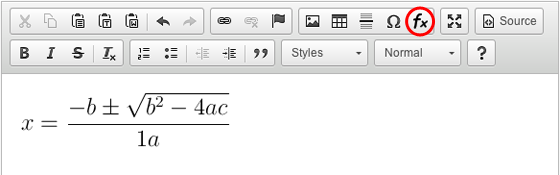
Example toolbar: CodeCogs Equation Editor button highlighted in a red circle.
Quick Installation
- Install the CK Editor as they recommend.
- Download CK-EqnEditor-plugin and uncompress it:
Download CKEditor EqnEditor.zip - Find the folder where you installed CK Editor. For our purposes we will assume this is
~/ckeditor. - Open the CK Editor plugins folder
~/ckeditor/pluginsand copy in the directoryequation/from the uncompressed folder you downloaded. - Modify the
config.jsto load the plugin by addingconfig.extraPlugins = 'eqneditor';, i.e.Modify config.js :
CKEDITOR.editorConfig = function(config) { config.extraPlugins = 'eqneditor'; config.toolbarGroups = [ ... ]; - Integrate the CK Editor into your HTML page and load in the normal way.
- The CodeCogs Equation Editor will appear within the insert toolbar Group.
- If you are using a customised toolbar, ensure
EqnEditoris included in the list of buttons, e.g:Add to <body> :
<textarea id="editor1" name="editor1"></textarea>
<script>
  CKEDITOR.replace( 'editor1', { toolbar : [ [ 'EqnEditor', 'Bold', 'Italic' ] ] });
</script>
Change History
- v1.2 (deprecated) - Our first version for CKEditor v4, which builds on our earlier version for CKEditor v3
- v1.3 (deprecated) - Improvement support for secure websites. Fixed bug that prevented equations being edited.
- v2 - Improved integration with the CKEditor, using CKEditor dialogs that appear on page.
- v2.1 - Bug fix that allows more Eqn plugins to work with multiple edit areas on a single page.
- v2.2 - General update in line with the movement of CodeCogs to new servers. (Recommended upgrade).
- v3 - Adds compatibility for CKEditor v5.