

Draw a molecule, get LaTeX
A free online chemical structure editor that writes chemfig — the LaTeX package chemists already use — so the structure you draw goes straight into a report, onto a web page, or into an exercise that asks your students to finish it.
- chemfig LaTeX
- SVG
- PNG
- 220+ structures
- Web pages
- Exercises
One drawing, wherever it is going
Most free drawers give you a picture. This gives you the structure as a line of LaTeX as well, and the LaTeX is what travels: into a document, onto a page, into a lesson.
Into your LaTeX report
Copy LaTeX gives you chemfig. Add the package to your preamble and paste: the structure is typeset with the rest of your document, and stays editable as text.
\usepackage{chemfig}
…
\chemfig{H_3C-C(=[1]O)-[7]OH}
Onto a web page
fxTeX Server draws any structure from a URL, as a sharp SVG, with nothing to install — free for light use. With fxTeX Pro, the page itself holds the chemfig and the reader’s browser draws it.
fxtex.codecogs.com/svg.image?\chemfig{H_3C-C(=[1]O)-[7]OH}Into slides and worksheets
Download SVG or PNG for Word, PowerPoint, Google Docs or anywhere that takes a picture. Keep the LaTeX, and you can change the drawing and download it again later.
A drawing that asks a question
Leave an atom out, or leave a box beside the structure, and the drawing becomes an exercise: only the boxes take typing, and what is typed can be read back and marked. Try these.
Finish the molecule
Ethanol is missing two atoms.
Name the bond
What joins the two carbons?
Name the group
What makes this an acid?
Make your own: in the Structure Editor, select an atom and tick A box to
fill in, or write {} in the LaTeX where the answer goes. On your own site, the editor’s
structure lock lets students type
only in the boxes and reads back what they wrote. Teachers using fxQuiz, now in
early access, draw structures into quiz questions with the same editor.
Coming from FreeChemDraw, MolDraw or the RCSB sketcher?
All four draw a structure for free in the browser. They differ in what you can do with it afterwards — and where the others are ahead, we say so.
| fxEditor | FreeChemDraw | MolDraw | RCSB Chemical Sketch | |
|---|---|---|---|---|
| Drawing | ||||
| Draw with the mouse, free | Yes | Yes | Yes | Yes |
| Start from a known structure | 220+ in a library | From its name | Name search | SMILES, InChI or ligand code |
| Structure, reaction and maths together | Yes | — | — | — |
| What you take away | ||||
| LaTeX (chemfig) for a report | Yes | — | — | — |
| An image, SVG or PNG | Both | Both | PNG | — |
| An image from a URL, for a web page | Yes | — | — | — |
| Fill-in exercises for students | Yes | — | — | — |
| Where they are ahead | ||||
| SMILES and MOL files | Not yet | Yes | SDF out | SMILES and InChI in |
| 3D view | Not yet | Yes | Yes | — |
| Search the Protein Data Bank | — | — | — | Yes |
The others as their own pages described them in November 2026. If you need SMILES, a 3D model or a search of the PDB, they are the better tools for that. If the structure is going into a document, a web page or a lesson, this is.
Drawing, not typing
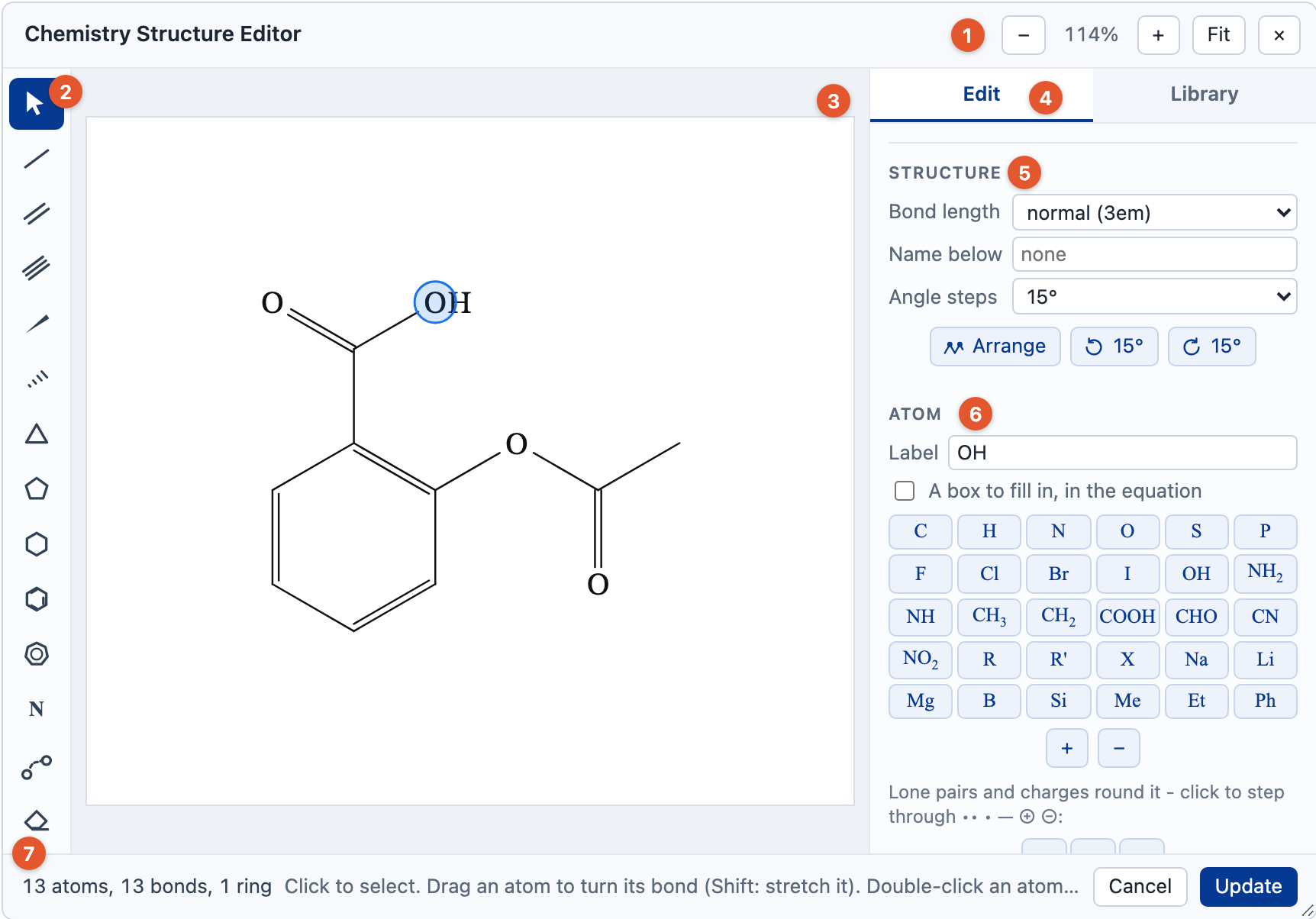
You never need to read the chemfig. The Chemistry Structure Editor draws with the mouse and writes it for you; open it from the button above, or from the first button of the chemistry toolbar.
The tools you expect
Single, double and triple bonds; wedges and hashes; rings of any size, benzene, fused rings; charges, lone pairs and atom labels. Chains zig-zag by themselves, and a bond check flags an atom with too many bonds.
A library to start from
Over 220 molecules, rings and functional groups, found by name, formula or abbreviation: caffeine, COOH, Phe. Click one to start a drawing, or to attach it to the atom you have selected.
Change it later
A structure stays a structure: click its bonds in the equation to open it again, change it, and update. The full guide to chemfig and the editor →
Questions
Will the LaTeX work in my own document?
It is chemfig, the package LaTeX documents use for structures: add
\usepackage{chemfig} to the preamble and paste. Reactions written with
\ce need \usepackage[version=4]{mhchem} too.
Can it open SMILES or MOL files?
Not yet. Start from the library of over 220 structures, or draw it; the tools above that read and write those files are better for that today.
How do I put structures on my website?
Use an image from fxTeX Server: the structure’s LaTeX in the
URL of an <img>, free for light use and licensed beyond it. With a Professional
or Enterprise licence, fxTeX Pro draws the chemfig in the page
itself.
What about reactions and formulae?
The same editor writes those too, with mhchem: \ce{2H2 + O2 -> 2H2O}.
Chemistry equations →
Is it free?
Yes, for non-commercial use: study, teaching, research, or a personal site. Structures made as part of work you sell — a book, a course, a product — need a licence. How licensing works.
FreeChemDraw, MolDraw and RCSB PDB are the names of their owners’ tools. CodeCogs is not affiliated with any of them.
Try it on the real thing
The full editor is on the home page, with suggestions as you type, history and every export format. It is free for non-commercial use — study, teaching, research or a personal site. Building it into something you sell needs a commercial licence.
More ways to use it
- Online equation editorWrite maths visually or in LaTeX, and copy it out as MathML, SVG or PNG.
- Maths equationsThe common formulae ready to edit, and a maths question to try each day.
- Chemistry equationsReactions, formulae and molecular structures, with a toolbar made for chemistry.
- LaTeX equation editorType LaTeX and edit the rendered equation directly; the two stay in step.
- MathML editorClean MathML with its spoken text, from LaTeX or from the visual editor.
- Accessible mathsEvery equation carries generated spoken text, tested with screen readers.
- Equations in WordPaste an equation into Word as a native equation you can still edit.
- CKEditor pluginAn fx button for CKEditor 5 that inserts MathML or an SVG image.
- LaTeX to SVG and PNGAn image of any equation from a single URL, with nothing to install.
- MathType alternativeHow the editor compares with MathType, gaps included.
- How we compareThe editor beside MathType, Overleaf, Mathpix and Word.